Programming
Laravel Custom Domains for SaaS: Automatic SSL with Cloudflare
Sooner or later, customers of a multi-tenant SaaS will ask to have their store on shop.mybrand.com instead of mybrand.yoursaas.com. To handle custom domains for a SaaS in Laravel, one developer has released an open-source package called a-khalid/cloudflare-saas-domains. Cloudflare for SaaS takes care of the certificates, but the rest of the work still falls to your app, and this package does that part.
Why it's harder than one API call
Creating a custom hostname through Cloudflare's API takes a single request. The trouble is everything around that request: a custom domain is a state machine that can run for days and depends on a person editing DNS somewhere else. Five things tend to catch developers out:
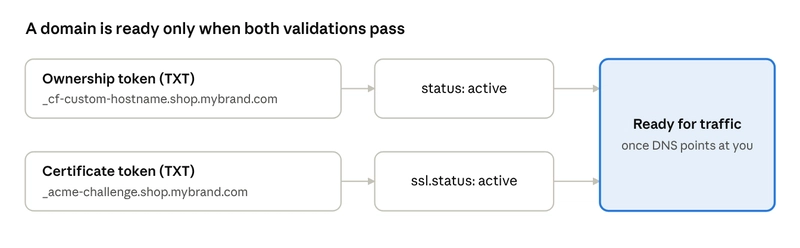
- There are two validations, not one. Hostname ownership and certificate issuance are separate, each with its own token and status. A domain is ready only when both are active and DNS points at you.
- The records you need may not exist yet. Cloudflare generates certificate validation tokens asynchronously, so the create response can come back without them. Your UI has to handle the case of not ready yet, ask again later.
- Polling makes events hard to get right. If you check a domain every five minutes, the congratulations email to the merchant must fire once, on the real transition, not on every poll. Two workers polling at the same time must not send it twice either.
- Failure is often normal. A does not CNAME to this zone error is expected until the merchant finishes DNS. A hostname that Cloudflare deleted after its validation window is a real problem. Your code has to tell them apart.
- Requests have to find the right tenant. Every request now arrives with a hostname your app has never heard of. That lookup runs on every request, so it needs caching, and the cache has to clear the moment a domain's status changes.
The whole flow in Laravel
The package needs PHP 8.3+ and Laravel 12 or 13, with a separate release for Laravel 10 and 11. On the Cloudflare side, you need a zone with Cloudflare for SaaS enabled, an active fallback origin, and an API token with SSL and Certificates Write. The flow breaks down into six steps:
- 1. Install and configure. Run composer require a-khalid/cloudflare-saas-domains, publish the config and migrations with vendor:publish, then run php artisan migrate. Fill in the env variables CF_SAAS_API_TOKEN, CF_SAAS_ZONE_ID, CF_SAAS_FALLBACK_ORIGIN, CF_SAAS_CNAME_TARGET, and CF_SAAS_BLOCKED_DOMAINS. After that, add the HasCustomDomains trait to your tenant model, such as Merchant.
- 2. Add a domain. Call CloudflareSaasDomains::add with the merchant model and the hostname from the request. The hostname is normalized and validated before any API call, including converting international domains to punycode. Four exceptions are safe to show the merchant: InvalidHostnameException, ApexDomainNotAllowedException, BlockedHostnameException, and DomainAlreadyClaimedException. Leave API errors to your exception handler, because their messages include internal details. Calling add twice is also safe: if the merchant already has that hostname, you get the existing domain back, with no API call and no event.
- 3. Tell the merchant what to do. CloudflareSaasDomains::instructions($domain) returns a list of DNS records through its required() method. For a new domain, the output looks something like this: CNAME shop.mybrand.com customers.your-saas.com, TXT _cf-custom-hostname.shop.mybrand.com 9e65b562-ab7c-479c-9c9a-9e6514632c5e, and TXT _acme-challenge.shop.mybrand.com PzbB9BB8zprTZlQ3deWWg2ad5o7j8f1s. A certificate can need two TXT values under the same _acme-challenge name, so tell merchants to add every record listed. The list follows the domain's state, so the merchant only sees what's still missing. Three flags cover the awkward cases: awaitingValidationRecords means the tokens aren't ready yet, retryRequired means validation failed, and hostnameGone means Cloudflare no longer has the hostname.
- 4. Let the status update itself. Schedule cf-domains:sync every five minutes and cf-domains:sync --all daily, both with withoutOverlapping. The first command checks pending domains. The second also checks live ones, which catches a hostname that stopped pointing at you or a certificate that lapsed. For a Verify now button, call CloudflareSaasDomains::retryValidation($domain).
- 5. React once, not on every poll. There are five events: DomainAdded, DomainVerified, SslActivated, DomainFailed, and DomainRemoved. Each fires only on a real state change, and the row is locked while the change is applied, so two concurrent polls can't both fire it. For example, a SslActivated listener can send a DomainIsLive notification to the tenant when the domain isLive() and the event is not a renewal. A DomainFailed listener can simply log the reason and hostname.
- 6. Resolve the tenant on every request. Wrap your routes in the cf-domains.tenant middleware, then read the tenant from $request->attributes->get('tenant'). Only active domains resolve, and any other host gets a 404. Lookup results are cached and cleared when a domain's status changes.
If you're building a multi-tenant platform in Laravel, such as an online store service or a website builder, this package can cut a lot of supporting code that teams often write themselves and get wrong in edge cases like duplicate events or stale caches.
Category
Programming
Share